← Documentation
Step 1 of 7Tenant Owner
Create a User
Before you can build a team, you need users in your tenant. Every person who will use PYC needs a user account. Once created, they will receive a verification email to activate their account.
1
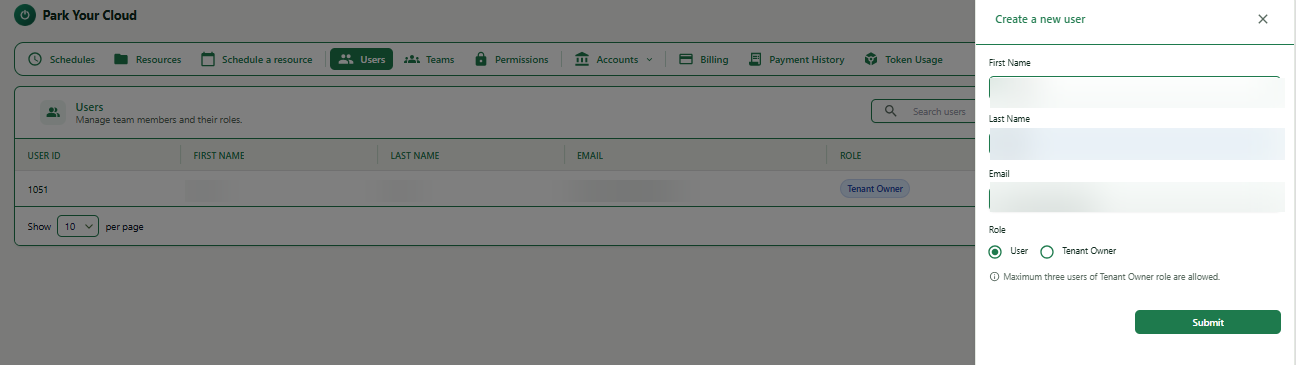
Navigate to Users and open the Add User panel
Expand
How to get here: Click Users in the top navigation bar, then click the + Add user button at the top right. A panel will slide in from the right.
2
Fill in the user details and submit
| Field | What to enter | Example |
|---|---|---|
| First Name | The user's first name. | John |
| Last Name | The user's last name. | Smith |
| Work email address. A verification link will be sent here. | john.smith@example.com | |
| Role | User - for regular team members. Tenant Owner - for account managers. | User |
1Click on Users in the top navigation bar.
2Click the + Add user button at the top right.
3Fill in First Name, Last Name, Email, and Role.
4Click Submit.
Important
Maximum 3 Tenant Owner users are allowed per tenant.
Note
The user is created but inactive. PYC sends a verification email to their address. They must click the link in that email to activate their account before they can log in.